
Best Wi-Fi Boosters Ireland 2026 | Mesh vs Extender vs Powerline | Expert.ie
Best Wi-Fi Boosters Ireland 2026: Mesh Wi-Fi vs Extenders vs Powerline
Fast broadband does not always mean good Wi-Fi in every room. You might get an excellent speed beside the router but struggle with video calls upstairs, buffering on a smart TV at the other end of the house or a weak signal in a garden office. In that situation, the problem is usually coverage rather than the broadband package itself.
The right fix depends on where the signal is weak. A Wi-Fi extender can be a sensible, affordable answer for one bedroom or home office. Mesh Wi-Fi is usually the better long-term route when several rooms or floors are affected. Powerline uses the electrical wiring to carry the connection and can be useful where thick walls make wireless coverage difficult. In some homes, the real issue is an old or poorly placed router.
This guide explains the difference in plain English and matches the most common Irish-home problems to live Expert.ie networking options. For a deeper answer, see our guides to mesh Wi-Fi versus Wi-Fi extenders, improving Wi-Fi upstairs, getting Wi-Fi into a garden office and Wi-Fi 6 versus Wi-Fi 7.
Quick answer: For one weak room, start with a Wi-Fi extender. For several weak rooms or a larger home, mesh Wi-Fi is usually the better long-term solution. Powerline can help where thick walls make wireless links difficult, but results depend on the electrical wiring. For a garden office, a wired Ethernet connection is the most dependable option where practical.
| Your Wi-Fi problem | Best starting solution | Expert.ie example | Why |
|---|---|---|---|
| One weak bedroom | Wi-Fi extender | TP Link AC750 WiFi Wall-plug Range Extender | RE200 | Affordable way to improve one specific area. |
| Weak upstairs and newer devices | Wi-Fi 6 extender | TP-Link Wi-Fi Range Extender | RE505X | Newer Wi-Fi generation plus a wired network socket for a TV, PC or console. |
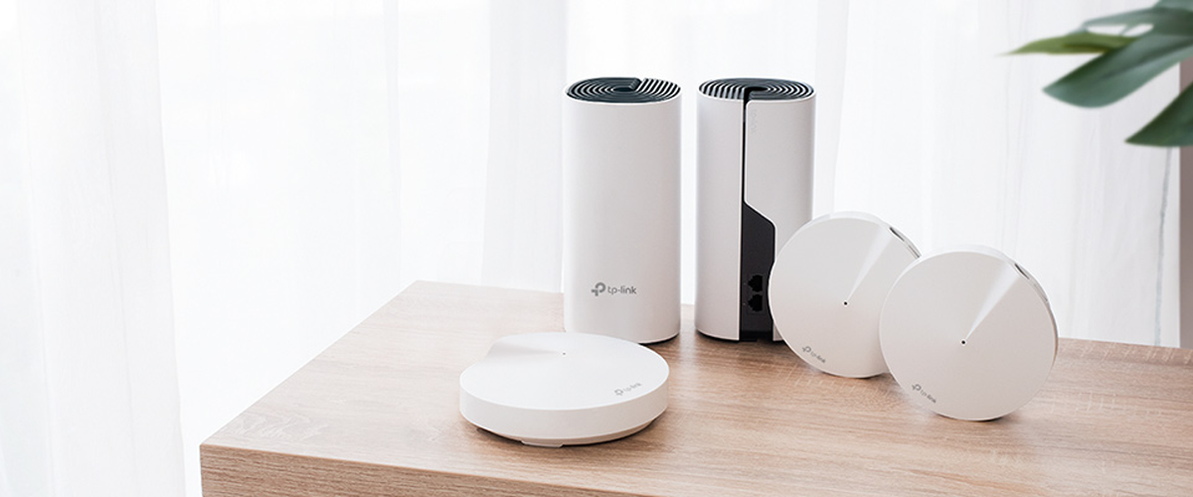
| Several dead zones around the house | Mesh Wi-Fi | TP-Link Deco X10 AX1500 Whole Home Mesh Wi-Fi 6 System | 2 Pack | Multiple units work together as one home network. |
| Large or busy family home | Stronger Wi-Fi 6 mesh | TP Link Whole Home Mesh WiFi 6 System | Deco X50 3 Pack | Better whole-home coverage and more wired ports at each unit. |
| Older home with difficult walls | Mesh, powerline or a hybrid system | TP-Link AX3000 + G1500 Whole Home Powerline Mesh WiFi 6 System | Deco PX50 3 Pack | A hybrid route can use both Wi-Fi and the electrical wiring. |
| Smart TV or console in a distant room | Powerline or a mesh unit with Ethernet | TP Link AV1000 Gigabit Passthrough Powerline Extender | TL-WPA7617 | Provides a wired connection at the far end as well as Wi-Fi. |
| Garden office | Ethernet first; outdoor mesh or powerline next | TP-Link AX3000 Outdoor Whole Home Mesh WiFi 6 Unit | Deco X50-Outdoor | Designed for outdoor placement and can join a Deco mesh system. |
| Wi-Fi is poor everywhere | Router diagnosis or upgrade | TP-Link Dual Band Gigabit Wi-Fi 6 Router | Archer AX55 | A booster cannot compensate for a weak main Wi-Fi source everywhere. |
Why is my Wi-Fi bad upstairs if my broadband is fast?
Your broadband speed is the connection entering the home. Wi-Fi is how that connection travels from the router to each phone, laptop, TV and games console. The signal gets weaker as it passes through distance, floors, walls and furniture. That is why a fast broadband package can still feel slow in an upstairs bedroom.
- The router is at one end of the house or hidden behind furniture.
- Thick masonry walls, concrete floors or foil-backed insulation weaken the signal.
- The house is long, split-level or spread across several floors.
- A busy household has many phones, TVs, smart-home products and laptops connected at once.
- The router is older and struggles to manage newer devices or a faster broadband plan.
- The extender or mesh unit is placed too far from the router to receive a good signal.
- The garden office or outbuilding is separated by exterior walls, distance or different electrical wiring.
Simple test: Run a speed test beside the router, then repeat it in the problem room. If the connection is good beside the router but much worse farther away, you are probably dealing with a Wi-Fi coverage problem. If it is poor even beside the router or over Ethernet, investigate the broadband service or main router before buying a booster.
Wi-Fi booster, extender, mesh or powerline: what is the difference?
| Technology | What it does | Best for | Main limitation |
|---|---|---|---|
| Wi-Fi extender | Receives the existing Wi-Fi signal and repeats it farther into the home. | One or two weak rooms. | It needs a usable signal where it is installed. |
| Mesh Wi-Fi | Uses two or more units that work together as one home network. | Several weak rooms, multiple floors and larger homes. | Usually costs more than one extender. |
| Powerline | Carries network data through the electrical wiring between plug-in adapters. | Difficult walls, wired TVs/consoles or rooms where Wi-Fi links struggle. | Performance depends on the property wiring and circuit layout. |
| Router upgrade | Improves or replaces the main Wi-Fi source. | Homes where Wi-Fi is weak even near the current router. | One router may still not cover a very large home. |
| Wired access point | Creates Wi-Fi from an Ethernet cable in the remote room. | The most dependable remote-room or office setup. | Requires a cable to be installed. |
Do Wi-Fi boosters actually work?
Yes, when the problem is weak coverage and the booster is positioned correctly. The most common mistake is putting an extender inside the dead zone. If the extender can barely hear the router, it has very little useful signal to repeat.
The TP-Link Mesh Wi-Fi Range Extender | RE315 is a useful example because its signal indicator helps with placement. Install an extender roughly between the router and the weak room, where it can still receive a healthy signal. Then test the problem room again.
Placement rule: Do not put a Wi-Fi extender in the dead zone. Place it between the router and the dead zone, where the original Wi-Fi signal is still good enough to repeat.
Best Wi-Fi extender for one weak room
Best affordable single-room booster
The TP Link AC750 WiFi Wall-plug Range Extender | RE200 is a compact wall-plug option for a spare bedroom, home office or one isolated weak spot. It is a sensible first step when most of the home already has acceptable Wi-Fi and the customer wants the lowest-cost fix.
Best-value extender with room to grow
The TP-Link Mesh Wi-Fi Range Extender | RE315 adds stronger dual-band coverage, a placement indicator, a wired network socket and compatibility with TP-Link OneMesh routers. It suits one or two weak areas and customers who may later want a more joined-up TP-Link network.
Best Wi-Fi 6 extender
The TP-Link Wi-Fi Range Extender | RE505X is the stronger route for newer phones, laptops, streaming and busier households. Its Gigabit Ethernet port is useful when a smart TV, PC or console can be connected to the extender by cable.
Best latest-generation extender
The TP-Link BE3600 Dual-Band Wi-Fi 7 Range Extender | RE220BE is the Wi-Fi 7 option for customers replacing or upgrading their network with newer technology. It is backward compatible, but the biggest Wi-Fi 7 benefits depend on the router and devices also supporting newer Wi-Fi features. It will not turn an old router and old phone into a complete Wi-Fi 7 setup.
When should you choose mesh Wi-Fi instead?
An extender solves a spot problem. Mesh solves a home coverage problem. Choose mesh when several bedrooms are weak, upstairs coverage is poor, the house is long or large, people move between rooms while on video calls, or the household would otherwise need several separate extenders.
A mesh system uses multiple units that share one network name. Your phone or laptop can move around the home and connect to the most suitable unit without the customer having to think about different Wi-Fi zones. Read the full mesh Wi-Fi vs Wi-Fi extender guide for a room-by-room comparison.
Best mesh Wi-Fi systems at Expert.ie
Best affordable entry to whole-home mesh
The TP Link Whole Home WiFi System | Deco M4 2 Pack is a straightforward way to replace a patchwork of extenders with one joined-up home network. One-, two- and three-unit Deco M4 options let the customer choose a pack that matches the size and layout of the home.
Best-value Wi-Fi 6 mesh
The TP-Link Deco X10 AX1500 Whole Home Mesh Wi-Fi 6 System | 2 Pack is a strong starting point for a two-floor home, a busy household or customers upgrading from older Wi-Fi. It combines Wi-Fi 6 with app-led setup and a single network across both units.
Best Wi-Fi 6 mesh for a larger or busier home
The TP Link Whole Home Mesh WiFi 6 System | Deco X50 3 Pack is the step-up whole-home route. Three units give more placement flexibility, and each unit has wired network sockets for devices such as TVs, consoles or desktop computers.
Best premium Wi-Fi 7 mesh route
The TP-Link BE3600 Whole Home Mesh WiFi 7 System | Deco BE25 3 Pack is aimed at customers replacing the full home network and wanting a longer-term Wi-Fi 7 setup. It makes most sense with very fast broadband, many connected devices and newer phones or laptops that can take advantage of the upgrade.
What is powerline Wi-Fi and when is it useful?
Powerline uses the electrical wiring to carry the network from one room to another. One adapter plugs into a wall socket near the router and connects to it by Ethernet. The second adapter plugs into the remote room and provides Ethernet, Wi-Fi or both, depending on the model.
For a wired endpoint, the TP-Link AV1000 Gigabit Passthrough Powerline Starter Kit | TL-PA7017P KIT is a practical route for a TV, console or desktop computer. The passthrough socket means the wall outlet is not completely lost.
For both Wi-Fi and Ethernet in the far room, the TP Link AV1000 Gigabit Passthrough Powerline Extender | TL-WPA7617 adds a wireless signal as well as a Gigabit wired connection.
Important: Powerline speed depends on the condition of the electrical wiring, how the circuits are arranged and electrical noise from other appliances. The headline speed printed on the box is not a guarantee of the internet speed you will see in the room.
Mesh vs extender vs powerline: which is best?
| Home situation | Best first route | Why |
|---|---|---|
| One bedroom has weak Wi-Fi | Extender | The simplest and most affordable targeted fix. |
| Upstairs is generally poor | Mesh | Two or more units can cover the floor rather than one corner. |
| Several dead zones | Mesh | Creates broader coverage under one network name. |
| Long bungalow or extended home | Mesh or powerline | Layout and wall construction decide whether wireless nodes can communicate well. |
| Thick stone or masonry walls | Powerline, wired access point or hybrid mesh | A wired path may cope better than repeating Wi-Fi through several walls. |
| TV or console needs stability | Ethernet, powerline or mesh node with Ethernet | A wired final connection is often more consistent. |
| Garden office | Ethernet first; outdoor mesh or powerline next | A separate building needs a stronger link than a normal indoor dead zone. |
| Wi-Fi poor beside the router | Router or broadband diagnosis | A remote booster is unlikely to fix the main source. |
Will a Wi-Fi booster make my internet faster?
Not by increasing the broadband speed entering the home. A booster improves the connection between the router and the device. If an upstairs laptop currently receives a very weak signal, better coverage can dramatically improve the speed it experiences. But if the broadband line itself only delivers a slow connection, an extender cannot create extra broadband speed.
The distinction that matters: A Wi-Fi booster does not increase the broadband speed coming into your home. It improves how effectively that connection reaches your devices.
Should you replace the router instead?
| What you notice | Most likely next step |
|---|---|
| Good speed beside router; poor farther away | Extender, mesh or powerline depending how many rooms are affected. |
| Poor Wi-Fi even beside the router | Check router placement, age and settings; consider a router upgrade. |
| Poor speed over Ethernet as well | Check the broadband service, line, modem or ISP before buying Wi-Fi boosters. |
| Many devices struggle at busy times | Consider a newer Wi-Fi 6 or Wi-Fi 7 router/mesh system. |
| Using 5G home broadband | A 5G router or compatible mesh route may be more relevant than a normal fixed-broadband booster. |
For a straightforward Wi-Fi 6 router refresh, the TP-Link Archer AX12 AX1500 Wi-Fi 6 Router is the budget route.
For a stronger Wi-Fi 6 upgrade, the TP-Link Dual Band Gigabit Wi-Fi 6 Router | Archer AX55 is suited to busier homes and faster broadband.
For customers replacing the router and deliberately moving to Wi-Fi 7, the TP-Link BE3600 Dual-Band Wi-Fi 7 Router | Archer BE230 provides newer wireless technology and faster wired ports.
For 5G home broadband rather than a fixed line, the TP-Link Archer NX200 5G AX1800 Wireless Dual-Band Gigabit Router combines a mobile-data connection with Wi-Fi 6 and EasyMesh support.
Wi-Fi 6 vs Wi-Fi 7: does it matter for a booster?
Wi-Fi 6 and Wi-Fi 7 are newer generations of Wi-Fi. Wi-Fi 6 is already an excellent fit for most homes in 2026, especially when the goal is better coverage and reliable performance across many everyday devices. Wi-Fi 7 adds newer features and more capacity on compatible equipment, but it does not automatically travel through walls better.
The result depends on the complete setup: the broadband plan, router, mesh or extender, placement and the phones, laptops or consoles using the network. There is no urgent reason to replace a good Wi-Fi 6 mesh system simply because Wi-Fi 7 exists. Read Wi-Fi 6 vs Wi-Fi 7: Is It Worth Upgrading Your Home Network? for the full answer.
Best Wi-Fi for gaming and streaming
For a fixed TV, console or gaming PC, Ethernet is the most dependable option. The next best route is often a mesh unit or powerline adapter in the room, connected to the device by Ethernet. A strong direct Wi-Fi connection can also work well, but the aim is consistency rather than chasing the highest number on the box.
The TP-Link Wi-Fi Range Extender | RE505X has a Gigabit Ethernet port for a TV, PC or console, while the TP Link Whole Home Mesh WiFi 6 System | Deco X50 3 Pack gives wired ports on every mesh unit. If the wiring performs well, a powerline kit can also provide a stable wired endpoint in a distant room.
Best Wi-Fi for a garden office
A garden office is not just another room. The signal may need to cross an exterior wall, open space and the office wall. The order of preference is usually: Ethernet cable with a Wi-Fi unit in the office; suitable outdoor mesh; indoor mesh for a close office; then powerline where the electrical supply supports it. A normal indoor extender should not be oversold for a distant outbuilding.
The TP-Link AX3000 Outdoor Whole Home Mesh WiFi 6 Unit | Deco X50-Outdoor is the strongest live Expert.ie route for an outdoor Deco link because it is designed for outdoor placement and can join other Deco units.
Read our full Best Wi-Fi for a Garden Office: Mesh vs Powerline Explained guide before choosing between cabling, mesh and powerline.
Recommended live Wi-Fi and networking products at Expert.ie
| Route / use case | Live Expert.ie product | Best fit / customer reason |
|---|---|---|
| Affordable one-room fix | TP Link AC750 WiFi Wall-plug Range Extender | RE200 | A simple wall-plug extender for one isolated weak area. |
| Best-value extender | TP-Link Mesh Wi-Fi Range Extender | RE315 | Adds placement guidance, a wired port and OneMesh compatibility. |
| Wi-Fi 6 extender | TP-Link Wi-Fi Range Extender | RE505X | Better fit for newer devices and a wired TV, PC or console. |
| Wi-Fi 7 extender | TP-Link BE3600 Dual-Band Wi-Fi 7 Range Extender | RE220BE | Latest-generation route for a wider Wi-Fi 7 upgrade. |
| Affordable mesh | TP Link Whole Home WiFi System | Deco M4 2 Pack | Joined-up coverage for a typical family home. |
| Best-value Wi-Fi 6 mesh | TP-Link Deco X10 AX1500 Whole Home Mesh Wi-Fi 6 System | 2 Pack | Two-unit whole-home upgrade at a sensible starting point. |
| Larger-home Wi-Fi 6 mesh | TP Link Whole Home Mesh WiFi 6 System | Deco X50 3 Pack | Three units, stronger capacity and wired ports on each unit. |
| Outdoor / garden office | TP-Link AX3000 Outdoor Whole Home Mesh WiFi 6 Unit | Deco X50-Outdoor | Outdoor-rated Deco unit for extending a compatible mesh system. |
| Wired powerline | TP-Link AV1000 Gigabit Passthrough Powerline Starter Kit | TL-PA7017P KIT | Carries the network over electrical wiring to a wired device. |
| Powerline with Wi-Fi | TP Link AV1000 Gigabit Passthrough Powerline Extender | TL-WPA7617 | Provides Wi-Fi and Ethernet in the remote room. |
| Hybrid thick-wall route | TP-Link AX3000 + G1500 Whole Home Powerline Mesh WiFi 6 System | Deco PX50 3 Pack | Combines Wi-Fi 6 mesh with a powerline path. |
| Router refresh | TP-Link Dual Band Gigabit Wi-Fi 6 Router | Archer AX55 | Stronger Wi-Fi 6 main router for homes with weak central Wi-Fi. |
Wi-Fi buying checklist
- Test the connection beside the router and in the problem room before buying.
- Count how many rooms or floors are affected.
- Choose an extender for one problem area and mesh for several problem areas.
- Place extenders and mesh units where they can still receive a good signal.
- Use Ethernet for fixed devices where practical.
- Treat powerline as wiring-dependent rather than guaranteed.
- Check whether you need a one-, two- or three-unit mesh pack.
- Do not pay for Wi-Fi 7 purely because it is newer; check the rest of the setup first.
- For a garden office, investigate cabling and electrical layout before assuming a normal extender will work.
- Keep the receipt and packaging until the system has been tested in the real home layout.
Frequently asked questions
What is the best Wi-Fi booster in Ireland?
For one weak room, a well-placed extender such as the TP-Link RE200, RE315 or RE505X is a sensible starting point. For several rooms or floors, a mesh system such as Deco X10 or Deco X50 is usually the better long-term route.
Do Wi-Fi boosters actually work?
Yes, when the issue is coverage and the booster is installed where it can still receive a good router signal. It will not help much if it is placed directly inside the dead zone.
What is the difference between a Wi-Fi booster and extender?
In everyday shopping language, the terms are often used for the same type of product. A range extender receives the existing Wi-Fi signal and repeats it farther into the home.
Is mesh Wi-Fi better than a Wi-Fi extender?
Mesh is better for several weak rooms, multiple floors and seamless whole-home coverage. An extender is more affordable when only one specific area is affected.
What is the best Wi-Fi solution for upstairs?
If one bedroom is weak, try an extender. If most of the upstairs floor is affected, a two- or three-unit mesh system is usually more suitable.
Where should I put a Wi-Fi extender?
Place it between the router and the weak room, where the original Wi-Fi signal is still usable. Do not place it in the dead zone.
Does a Wi-Fi extender make the internet faster?
It does not increase the broadband speed entering the home. It can improve the speed experienced by a device that currently has a weak Wi-Fi connection.
How many mesh Wi-Fi units do I need?
Many average homes can start with two units. Larger, longer or multi-floor homes may need three. Placement and construction matter more than floor area alone.
Do mesh systems replace the router?
Some systems can take over routing, while others can work with the existing router. The best setup depends on the broadband equipment and whether modem-only or access-point modes are available.
What is powerline networking?
Powerline carries the network through the electrical wiring between plug-in adapters. It can provide Ethernet, Wi-Fi or both in a remote room.
Does powerline work in every house?
No. It can work very well, but results depend on the wiring, circuits and electrical noise in the property.
What is the best Wi-Fi for thick walls?
A wired access point is the most dependable route. Powerline or hybrid mesh can also be useful. Standard mesh can still work if the units are placed where they can communicate well.
How can I get Wi-Fi in a garden office?
Ethernet with a Wi-Fi unit in the office is the strongest option. Outdoor mesh and powerline are practical alternatives where the property layout supports them.
Should I upgrade my router instead of buying a booster?
Consider the router first if Wi-Fi is weak even beside it. If Wi-Fi is good near the router but poor farther away, a coverage solution is more likely to help.
Is Wi-Fi 7 worth it in 2026?
It can be worthwhile when replacing the network, using very fast broadband and owning newer compatible devices. A good Wi-Fi 6 system remains an excellent choice for most homes.
What Wi-Fi is best for gaming?
Ethernet is best where practical. A mesh node or powerline adapter connected by Ethernet can also provide a stable connection in a distant room.
Final verdict: fix the coverage problem, not just the product name
The best Wi-Fi booster is the one that matches the shape of the problem. Choose a simple extender for one weak room. Choose mesh when several rooms or floors have poor coverage. Consider powerline or a wired access point when thick walls make wireless links difficult. For a garden office, Ethernet is the most dependable solution, followed by suitable outdoor mesh or powerline where the property supports it.
Shop Wi-Fi boosters, routers, powerline adapters and the full Expert.ie networking range. Expert.ie is 100% Irish owned, with delivery nationwide, Click & Collect where available, Best Price Promise, Easy Returns and support from local Expert stores.
Recent Posts
-

How Much Laptop Storage Do You Need? 256GB vs 512GB vs 1TB SSD
How Much Laptop Storage Do You Need? 256GB vs 512GB vs 1TB SSD Laptop storage is easy to underestim …16th Oct 2026 -

MacBook vs Windows Laptop: Which Is Better for You in 2026? | Expert.ie
MacBook vs Windows Laptop: Which Should You Buy in 2026? A MacBook and a Windows laptop can both be …14th Sep 2026 -

Chromebook vs Windows Laptop: Which Is Better in 2026? | Expert.ie
Chromebook vs Windows Laptop: Which Should You Buy in 2026? A Chromebook can cost less than many Wi …10th Sep 2026